Angular Material Forms (Learn it in 14 Steps)
Hi Everyone !!!
Am Srikanth Y,
Software Engineer | Front End Developer |Story Teller | Problem solver, Having Realtime experience in Angular, JavaScript, and Java.
Git Hub: github.com/mryenagandula. StackBlitz : stackblitz.com/@mryenagandula Medium: mryenagandula.medium.com
Please support Srikanth Y (buymeacoffee.com/mryenagandula)
Note To Audience : There is a problem in some Articles due to the conversion of the medium articles. Am working on modifying them. Sorry For the inconvenience.
Thanks
- Create an angular project with the below command.
ng new angular-material-forms
2. After successful creation of an angular app, change the file directory to project-name. “cd angular-material-forms”.
Open the project in vs code using “code .” in terminal or open with vs code. Then run the project using “ng serve” in a terminal. Open project in chrome using
**localhost:4200**
3. Open the app component in vs code and remove the content which is created by angular CLI while creating the app.
For Adding angular material using the command
**"ng add @angular/material"**
4. Select theme, Am selecting Indigo/Pink, and click the below items as “yes”
- Set up global Angular Material typography styles? Am selecting as
y - Set up browser animations for Angular Material? (Y/n) Select ‘y’.

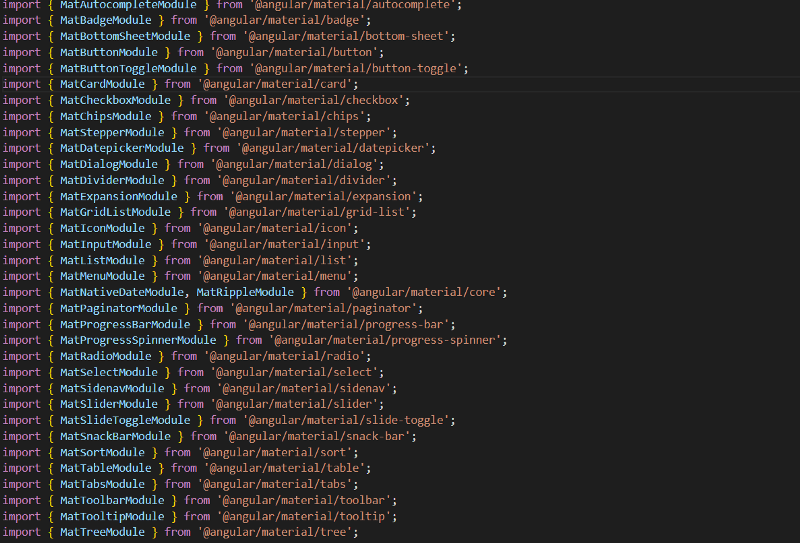
5. Created Shared Module in the libs folder using “ng generate module shared”. And import , export material modules in “shared.module.ts”. And also add in the app.module.ts

shared.module.ts
6. Create audits component in the apps/component folder. And add audits component in router and path as audits.
7. Add “ReactiveFormsModule”, and “Forms Module” in app.module.ts as below
import { FormsModule, ReactiveFormsModule } from '@angular/forms';@NgModule({
declarations: [
AppComponent,
SignupComponent
],
imports: [
BrowserModule,
AppRoutingModule,
BrowserAnimationsModule,
FormsModule,
ReactiveFormsModule,
SharedModule
],
providers: [],
bootstrap: [AppComponent]
})
export class AppModule { }
8. Open “audits.component.ts”, then add “formbuilder ” as a dependency in the constructor. Create a form variable above the constructor.
import { FormArray, FormBuilder, FormGroup, Validators } from '@angular/forms';
public form:FormGroup;
constructor(private fb:FormBuilder) { }
ngOnInit(): void { }
9. Create formInit method to initialize the form and call the method from either constructor or ngOnInit.
constructor(private fb:FormBuilder) {
this.formInit()
}
ngOnInit(): void { }
private formInit(){
}
10. And create a form group using form builder and add controls in that same form. Form Controls like “firstName”, “second Name”, “email”, “username”, “password”, and “mobile”.
private formInit(){
this.form = this.fb.group({
firstName: ['',[Validators.required]],
lastName: ['',[Validators.required]],
username: ['',[Validators.required]],
email: ['',[Validators.required]],
password: ['',[Validators.required]],
});
}
11. After successfully following the above points. Add Html in signup.component.html related to the form step by step.
- Add div and form tag in Html file.
<form class=”form shadow m-3 p-3" [formGroup]=”form” (ngSubmit)=”submitForm()”>
Sign Up Form
- Increase code by one form control and add validate message also.
Sign Up Form
<mat-form-field class=”col-md-6">
First Name
- Add all the controls and form validation messages.
Sign Up Form
First Name
First Name is required
Last Name
Last Name is required
User Name
Username is required
Email
Email required
Password
Password is required
Submit Form
Reset
12. After successfully adding the Html code and checking the changes in the browser. Add the submit method in signup.component.ts.
public submitForm(){
console.log(this.form);
console.log(this.form.getRawValue())
}
13. Test the form by giving all the forms and clicking on submit. You can able to see the values in the console.
14. And if you did not give values in the form you can able to see the error messages.
Output Screens:

output screen #1

output screen #2
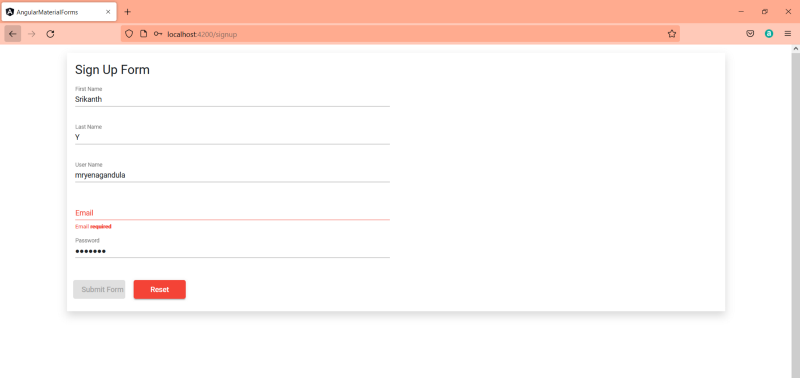
output screen #3
Source Code
GitHub: https://github.com/mryenagandula/angular-material-forms
Stack blitz Project Preview: Mryenagandula - Angular Material Forms - StackBlitz
Thanks for reading my article, Please share your feedback, claps, and comments. In that way, it will be helped me to improve my articles in the future. Please share my story with your near and dear, Also follow and subscribe to the medium.


